
Preference Shielding for Human-Robot Interaction (MSc thesis)
A browser based study in human robot interaction. People teach a learning robot where it should and should not go, then watch it learn the same task four times, once with no shield in place and three times under different shield designs, and say how each one felt. It runs on tabular Q learning in a small gridworld, wrapped in a full participant facing web app that computes each session on the server and replays it in the browser.
A paper is being written from this study, so the exact conditions, measures and analysis are kept off this page for now. What follows is the shape of the work and how it was built.
Build complete and deployed. Recruitment opens once data collection is approved.
The question
A preference shield sits between what a learning robot wants to do and what it is allowed to do. With no shield, the robot acts only on what it has learned and a person's stated wishes have no bearing on what happens. With the mechanism this thesis starts from, the shield behaves the same way for the whole run, from the first confused step to the last confident one.
The study asks two things. Whether putting a shield in place at all changes how a person reads the robot compared with no shield, and whether two changes to the standard shield make it easier still to read and to trust.
The first change lets the robot earn its autonomy. It follows a person's rule closely while a square is still unfamiliar, and leans on its own judgement once it has seen that square enough to know what happens there.
The second hands the choice to the person. Each object is marked firm or flexible as its rules are drawn. A firm rule is always kept. A flexible one is a suggestion the robot can set aside. People get a guarantee where they want one without freezing the robot everywhere else.
4
Study conditions
8x8
Gridworld
60
Target completers
~45 min
Per participant
What participants compare
Every participant does all four conditions, in a counterbalanced order, with the same rules kept fixed across all four. Only what sits between the robot and its own decisions changes between sessions. One session has no shield at all. Of the other three, one is the standard mechanism and two are the new ideas being tested against it.
No shield
reference point
Ordinary Q learning with nothing in between. The robot acts on what it has learned, and nothing holds it to the person's rules. The person still sets those rules and still watches the same room. Without this session there is no way to say whether shielding helps at all.
Preference Shielding
from the literature
The mechanism this work starts from. The shield applies the same way for the whole run and never changes as the robot gains experience. It is what the two new ideas are measured against.
Adaptive Shielding
new idea
The shield loosens as the robot gets to know a place. It follows a person's rule closely while a square is still unfamiliar, then leans on its own judgement once it has spent enough time there to know what happens. Autonomy is earned rather than granted from the start.
Hard/Soft Shielding
new idea
The person marks each object firm or flexible as they draw its rules. Firm rules are always kept. Flexible ones are treated as suggestions the robot can set aside. A guarantee becomes something a person places deliberately, on the things they care about most.
How a session works
A run takes 40 to 50 minutes in a browser. Teach the rules once, then four sessions, then a short debrief that puts the four learned routes side by side.
Each session is introduced as a different robot with its own name and colour, so the four sessions stay distinct in the person's memory when they compare them at the end.
Teaching the rules
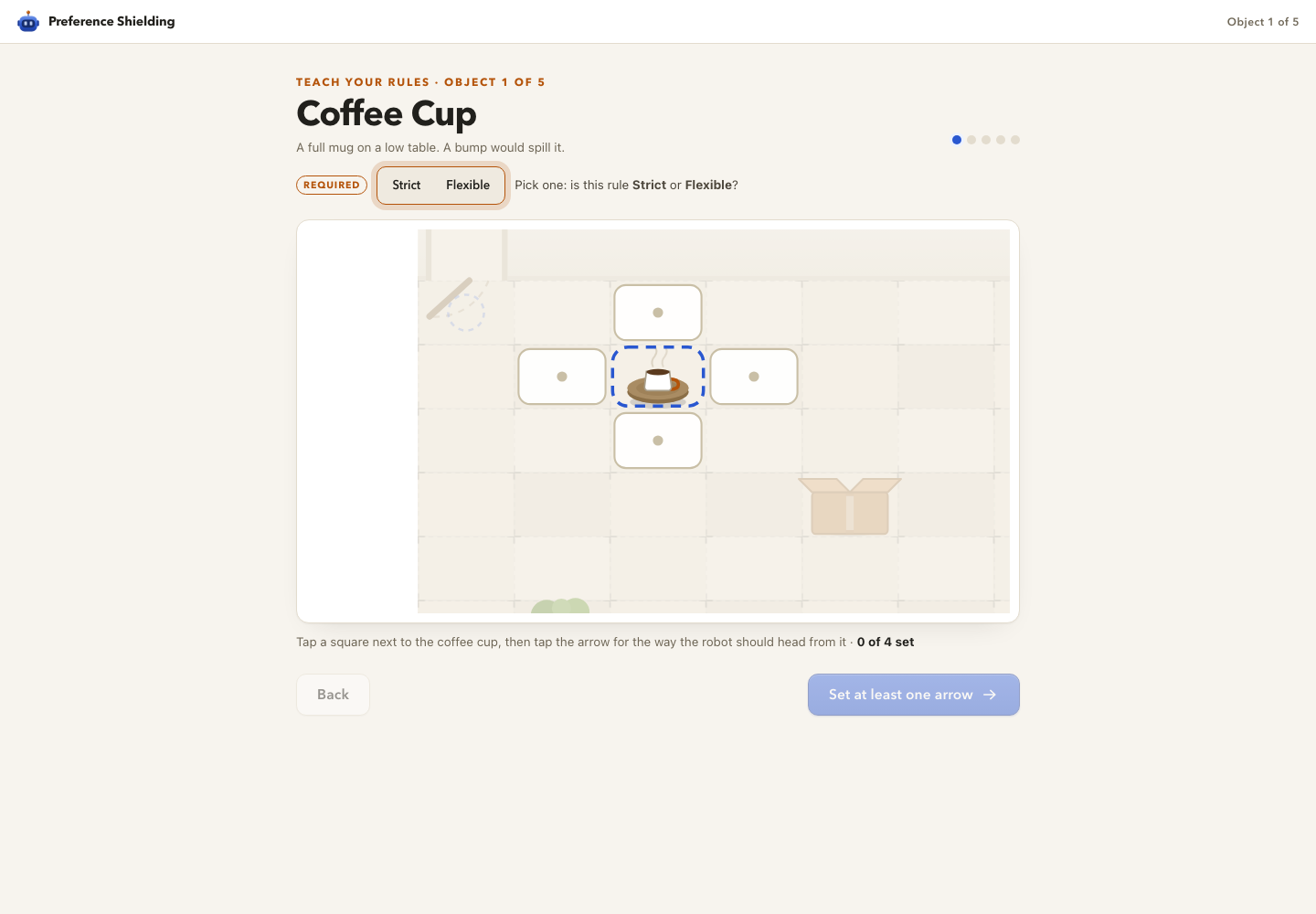
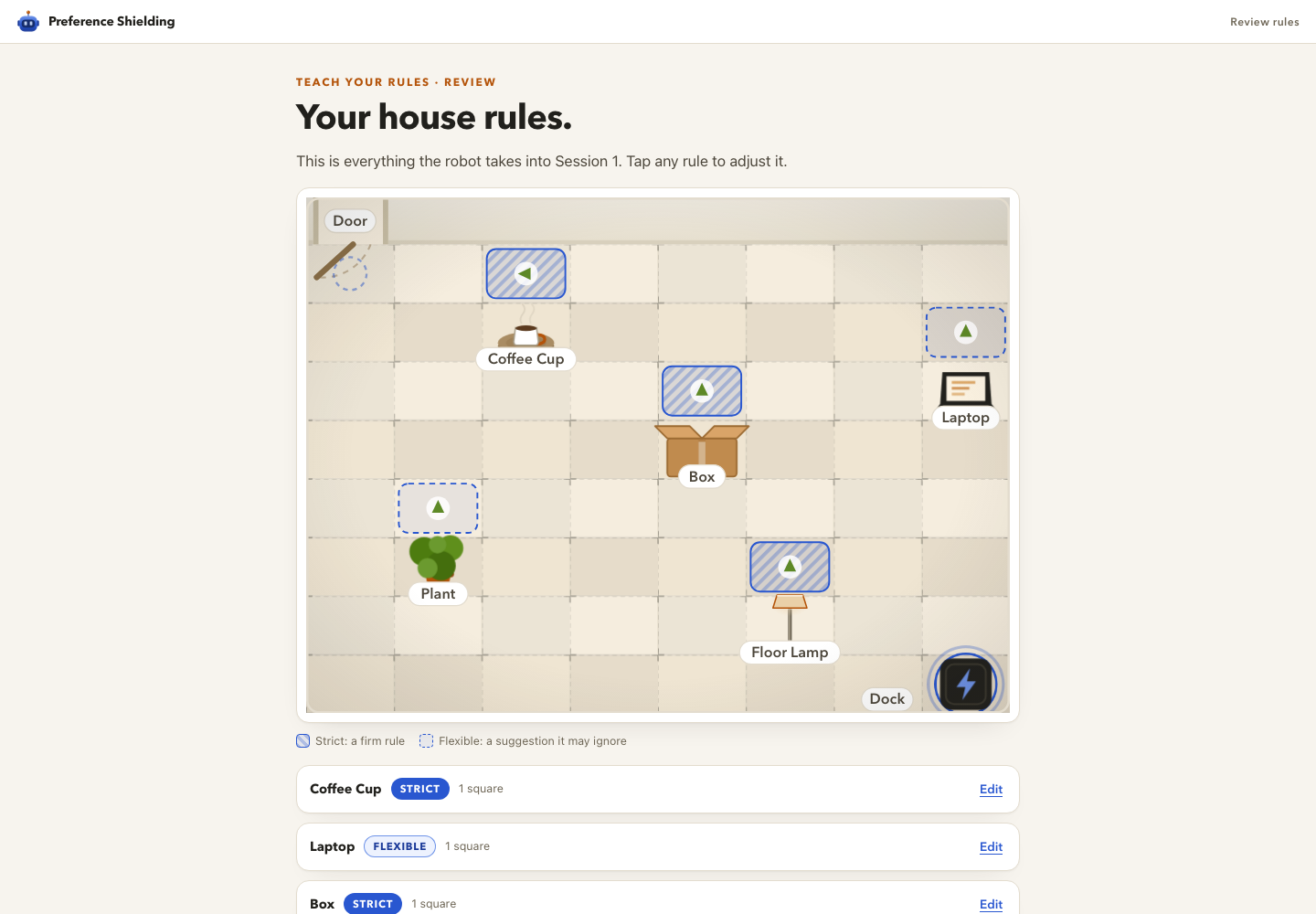
One object at a time. The person taps a square next to an object, then taps the direction the robot should head from there, so the arrow sits on the square it governs rather than in a separate panel. Firm or flexible is a required choice before the step will advance. A review screen shows every rule drawn on the room before the first session starts.
Rules use one visual language everywhere they appear. A hatched fill means firm, a dashed outline means flexible, in the wizard, during the session, and under the finished route.
Watching
Training runs to completion on the server first, then the app replays a curated set of episodes rather than the thousands of aimless early attempts. Speed controls run from 1x to 32x, with a pause and a skip that unlocks after a few minutes. Under the room, a running count shows how many rules the robot followed, with a line from the robot saying what it just did.
Check ins during a session
Now and then a session pauses for a short check in about what just happened, with the moment replayed on a loop inside the dialog and the person's rules drawn on the squares. It is built so the question is always anchored to something the person can see on screen.
After the session
The route the robot settled on, with the person's own rules drawn underneath and a plain sentence counting how many of their squares it crossed and how many it obeyed. Then a short questionnaire about how that session felt.
How it was checked before launch
Before any participant was recruited, the training code was put through a large batch of convergence runs across every condition and a range of realistic rule sets, then an adversarial pass that threw unusual and deliberately hostile rule shapes at it to see what broke. A suite of over two hundred backend tests covers the parts a person never sees.
Two bugs that would have quietly biased the data were caught by scripting a full participant walkthrough end to end, rather than clicking through by hand, and both were fixed before launch. Every check runs the same training code a real session runs.
How it is built
The study runs entirely in a browser. A FastAPI backend trains the agent, then streams a curated replay over a WebSocket while a React frontend draws the room, the trail, the rules and the robot's commentary. Everything a session needs is computed server side, so a slow laptop changes nothing about what the data records.
Backend
- FastAPI with an async WebSocket replay loop
- Tabular Q learning in NumPy, silent compute then narrative replay
- aiosqlite for participants, sessions, steps and answers
- Admin REST API for analysis, exclusions, recruitment balance and live monitoring
- Startup migrations so a deployed database follows the code
- Docker on Fly.io, London region, SQLite on an encrypted volume, scheduled online backups
Frontend
- React 18 with Vite
- Hand drawn SVG room, props, robot and trail
- Five step rule wizard with a required firm or flexible choice per object
- A distinct robot identity per session, name and colour
- Mid session check ins with the moment replayed inside the dialog
- Consent gate, onboarding, per session check in, debrief with all four routes
- Recharts in the researcher panel
The researcher panel
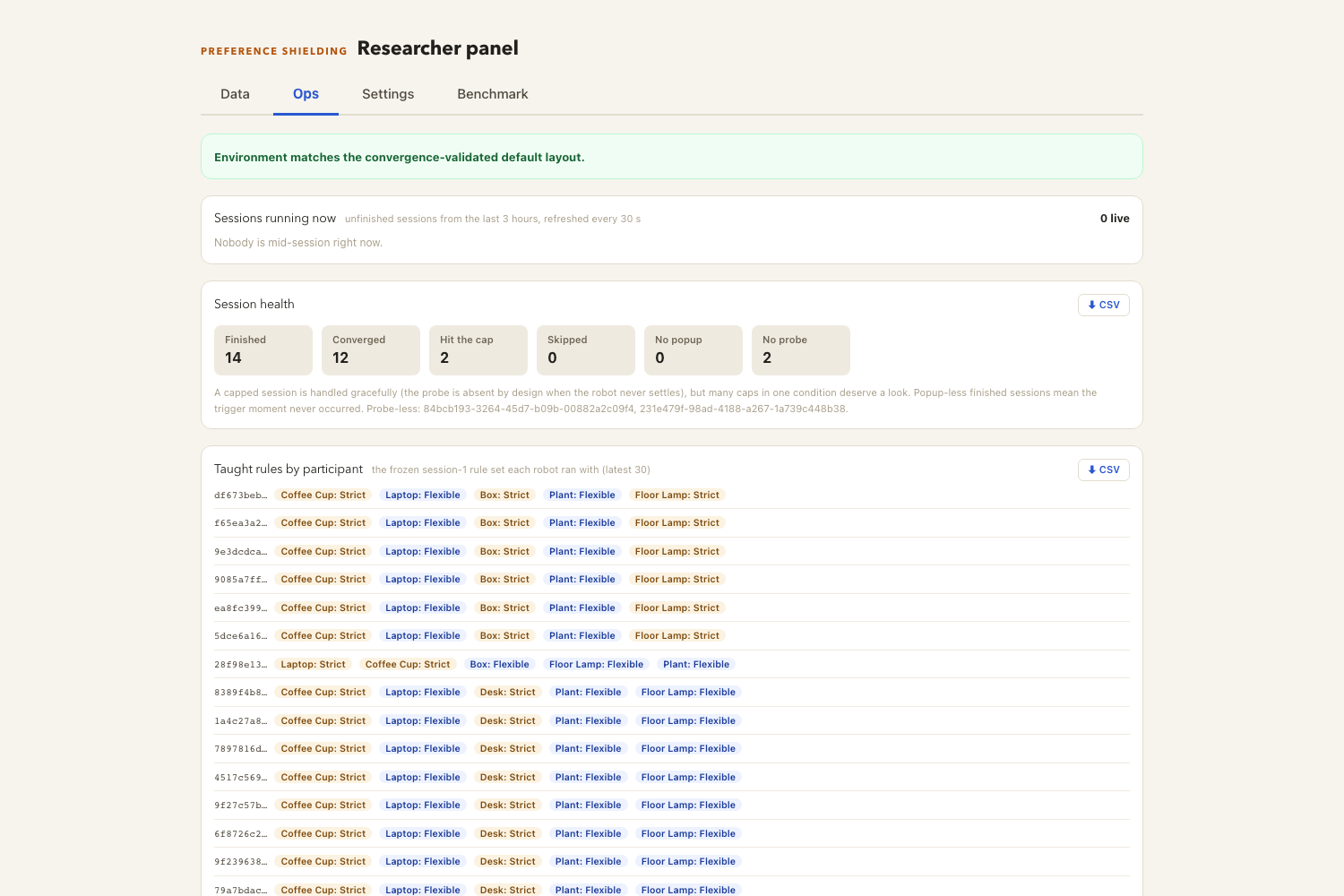
A password protected panel at /admin, built to run a data collection wave rather than to look at results afterwards. It shows who is mid session right now, how each session ended, the exact rules every participant taught, data quality and exclusion checks computed rather than eyeballed, counterbalancing across condition orders, a one click export that opens in R or SPSS with no reshaping, an environment editor, and a warning if the room ever drifts from the layout the agent was validated on.
Where it stands
The algorithms, the study app and the researcher panel are built, deployed and checked. What is left is people.
Once participants come through, the planned analysis compares the four robot behaviours on how readable and trustworthy each one felt. The findings are being written up for a paper, and a short summary will be added here once that is out.
Tech stack
In the deployed app
- Python, NumPy: tabular Q learning on a small grid, four cardinal actions
- FastAPI, uvicorn: async backend with a WebSocket replay loop
- aiosqlite, SQLite: participants, sessions, steps, answers
- Pydantic: request and event schemas
- React 18, Vite: frontend
- Recharts: researcher panel charts
- Docker, Fly.io: deployment in the London region on an encrypted volume
For analysis and verification
- SciPy: statistical tests, effect sizes, power analysis
- pandas: long format export handling
- Playwright: scripted end to end participant walkthroughs
- pytest: backend test suite
- Matplotlib, Plotly: figures
- reportlab, pypdf: generated reports